Main Window Layout
The SnapTrim interface is designed for simplicity and efficiency. Here’s what each section does:
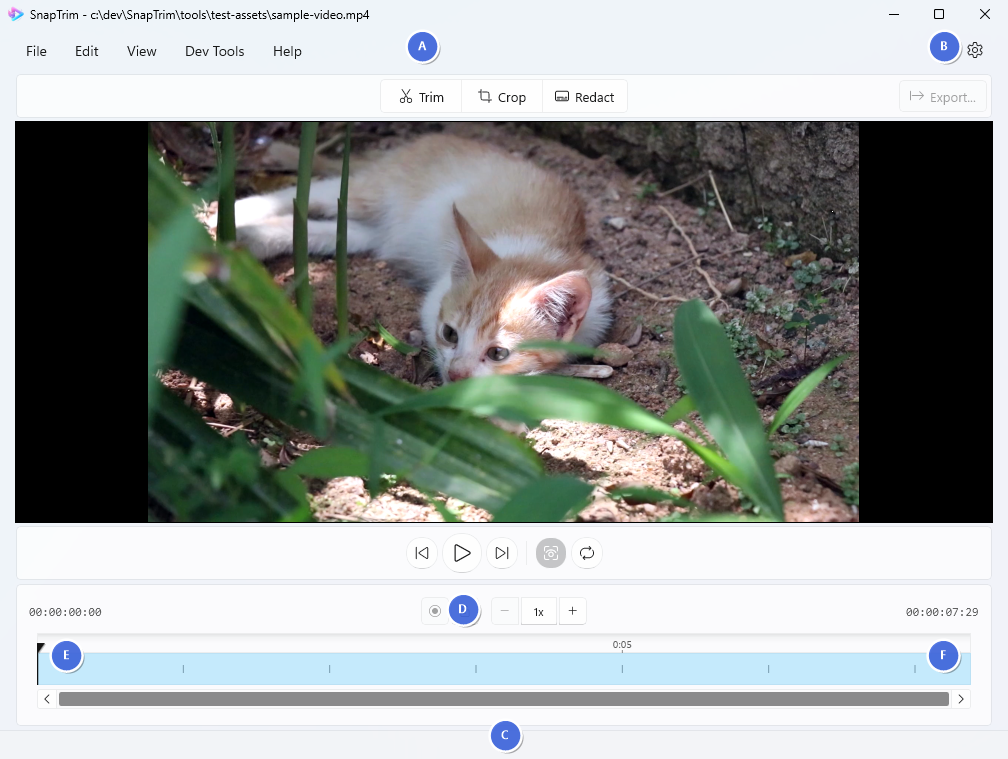
| Label | Description |
|---|---|
| A | Mode Selector - switch between Preview, Trim, Crop, and Redact modes |
| B | Export Button - save your edited video |
| C | Timeline - click to seek, and drag handles (visible in Trim and Redact modes) |
| D | Playback Controls - play, pause, and navigate |
| E | Current Time - shows playhead position |
| F | Duration - total video length |
| G | Audio Controls - mute toggle and volume slider for playback audio |
Customising the Interface
Theme Selection
Choose between Light, Dark, or System (automatic) themes:
- Open Settings (⚙️)
- In the Appearance section, choose your preferred theme
Settings Panel Position
You can dock the settings panels on either side of the screen:
- Open Settings (⚙️)
- In the Appearance section, find Settings Panel Position
- Choose between “Right” (default) or “Left”
This is useful for left-handed users, multi-monitor setups, or personal preference.
Responsive Design
SnapTrim adapts to different window sizes:
- Full screen - Maximum workspace for editing
- Windowed mode - Work alongside other apps
- Minimum size - 1024x768 recommended